Full Menu

Dental Lab for QuickBooks

The complete dental lab.
Built around QuickBooks.

Dental Lab Starter

Powerful case management.
One workstation.

Dental Rx

The modern portal for dental labs that want to grow.

Support

Best support in the industry.
Your ideas shape the software.

New to Mainstreet Systems? Try Dental Lab for QuickBooks free for 30 days — we handle setup.
No credit card required We handle setup 30 days free
DentalRx Dental Lab Portal

The modern portal for
dental labs that want to grow.

Doctors submit cases online, files attach instantly, and everything flows straight into DentaLab for QuickBooks — no phone calls, no re-entry, no missed work. Your lab stays connected to every doctor, every case, in real time.
No re-entry
Live in 48 hours
Any digital file type
Since 1979
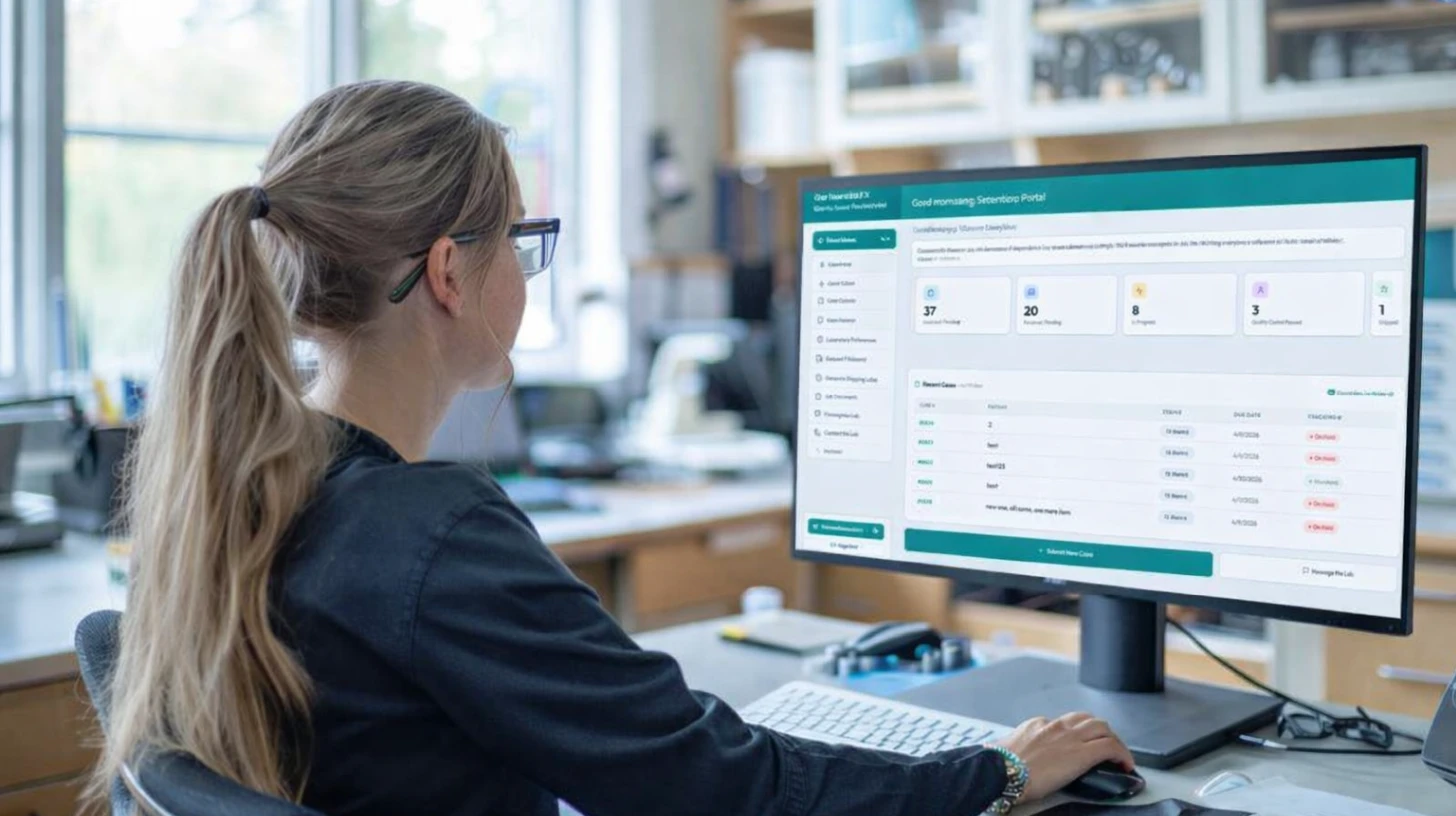
Dental lab technician using DentalRx online case submission portal software at a dental prosthetics laboratory workbench
Portal at a glance
Live
5–10+ Hours Saved Per Week Less phone time, less re-entry
Under 5 Minutes to Submit Online, any time of day
Zero Re-Entry Straight into DentaLab for QuickBooks
Any Digital File STL scans, X-rays, photos
Unlimited Doctors One portal, every account
The Problem Every Lab Faces

Your lab is losing time — and losing doctors — to friction.

Every phone call to take a case, every status question, every fax sent is time your staff isn't spending on production. And when a doctor finds a lab that's easier to work with, they leave.

Hours lost to phone calls every week

Staff take case details over the phone, transcribe them by hand into your lab software, and answer status calls all day. That's 5–10+ hours of production time gone before anyone picks up a tool.

Every case entered twice

The doctor fills out a paper prescription. Your team re-enters it into the lab software. Two chances for errors, one wasted step. Every single case, every single day.

Doctors leave for easier labs

The single biggest reason a doctor switches labs is friction. If calling your competitor is easier than calling you — or if a competitor already has an online portal and you don't — you're already losing accounts.

DentalRx fixes all three
5–10+
Hours saved per week
Time your staff gets back for production and relationships
<5 min
To submit a case
Online, any time — no phone call, no fax, no wait
Zero
Re-entry required
Cases go straight into DentaLab for QuickBooks automatically
48 hrs
To go live
Most labs are fully set up and taking portal submissions within a day
How It All Connects

One submission. Everything in sync.

DentalRx connects your doctors directly to your lab software and QuickBooks — automatically. No re-entry, no manual steps, no dropped information. Your doctors don't need custom software, DentalRx works for everyone.

Dr.
DENTAL OFFICE
Dental Office
Accesses DentalRx
DentalRx
DentalRx Portal
Doctor views & submits cases
DQB
DentaLab
DentaLab for QuickBooks
Case enters lab software
QuickBooks
 (Desktop & Online)
Always synced in real-time
No double entry, ever A case submitted through DentalRx flows directly into Dental Lab for QuickBooks. Your staff never touches a keyboard to receive it.
Real-time on both sides Doctors see case status as your lab updates it. Your team sees new submissions the moment they arrive.
QuickBooks always in sync Every case that ships generates an invoice in QuickBooks automatically. No manual posting, no missed billing.
Connected Case Submission

Your lab's data, in the doctor's hands.

Doctors don't fill out free-text fields — they select directly from your lab's procedures, items, and enclosures as defined in Dental Lab for QuickBooks.

You control every option. Nothing gets lost in translation.

How it works
1
Patient details entered
Name, age, shade & tooth numbers.
2
Procedure selected from DQB
Your lab controls every option doctors see.
3
Enclosure selected
Doctor picks what to return with the case.
4
Digital files attached
STL, X-rays, photos — any format.
5
Submitted to DentaLab
No re-entry. Straight into Dental Lab for QuickBooks.
DentalRx Portal — Submit a Case
Case Management Portal
Dashboard
Submit Case
Quick Submit
Case Calendar
Case History
Messages
Submit a Case
Fill in patient details, select procedures or items, and submit to the lab.
1
Patient Information
Patient Name *
Full name
Age *
Age
Shade *
Select a shade...
Teeth *
Tooth numbers
2
Prescription Items — Standard Procedures
Bridge-Maryland
Crown-Full Cast NP
Crown-Full Cast Yellow Gold
PFA-Porcelain Fused to Aspen
3
Prescription Enclosures
Articulator
Full Model
Lower Impression
Shade Guide
3
Images, Documents & Digital Files
Click to browse or drag & drop files
STL · OBJ · DCM · JPG · PDF · ZIP and more
scan_mitchell_14.stl
Order Summary
Patient
Procedure
Enclosure
Files
Dr. Chen
Case Sent to the Lab!
Crown-Full Cast NP for Sarah Mitchell has been received and is now in production.
In Production — Dental Lab for QuickBooks
Real-Time Case Visibility

Every case, every status, no phone call needed.

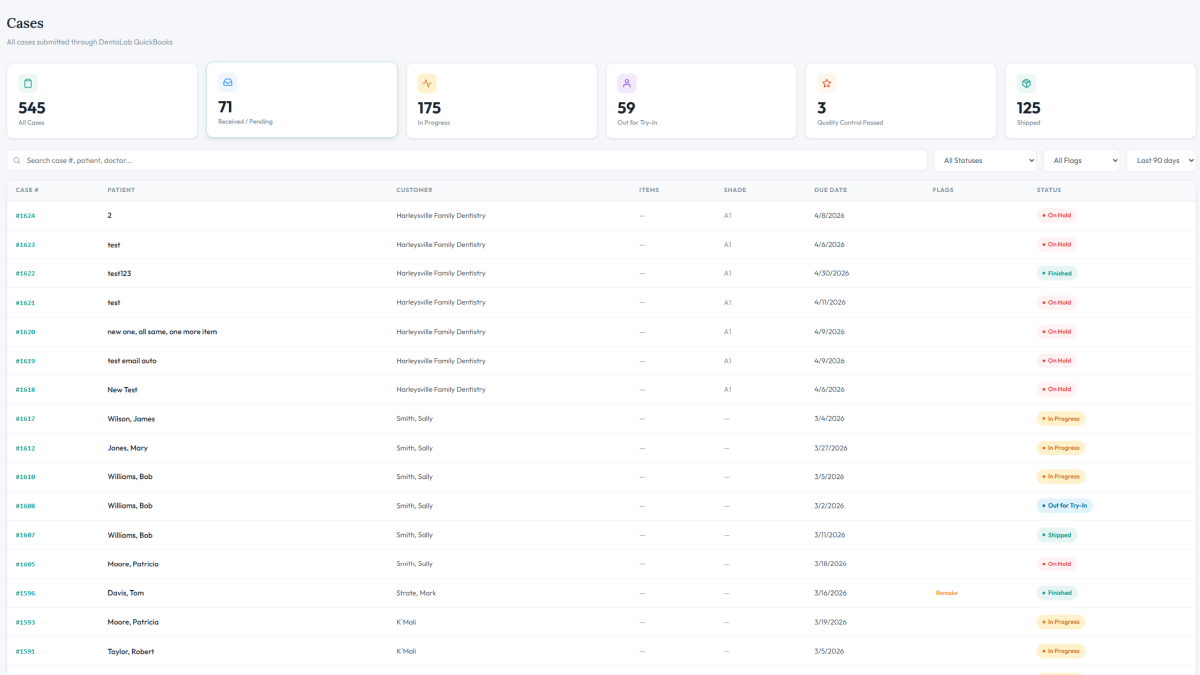
Doctors log in and see exactly where their cases stand — in progress, shipped, due dates, item-level status. Everything updated in real time as your lab works.

What doctors see
1
Live dashboard
Cases at a glance — active, pending, shipped.
2
Full case detail
Progress timeline, item-level status, lab notes.
3
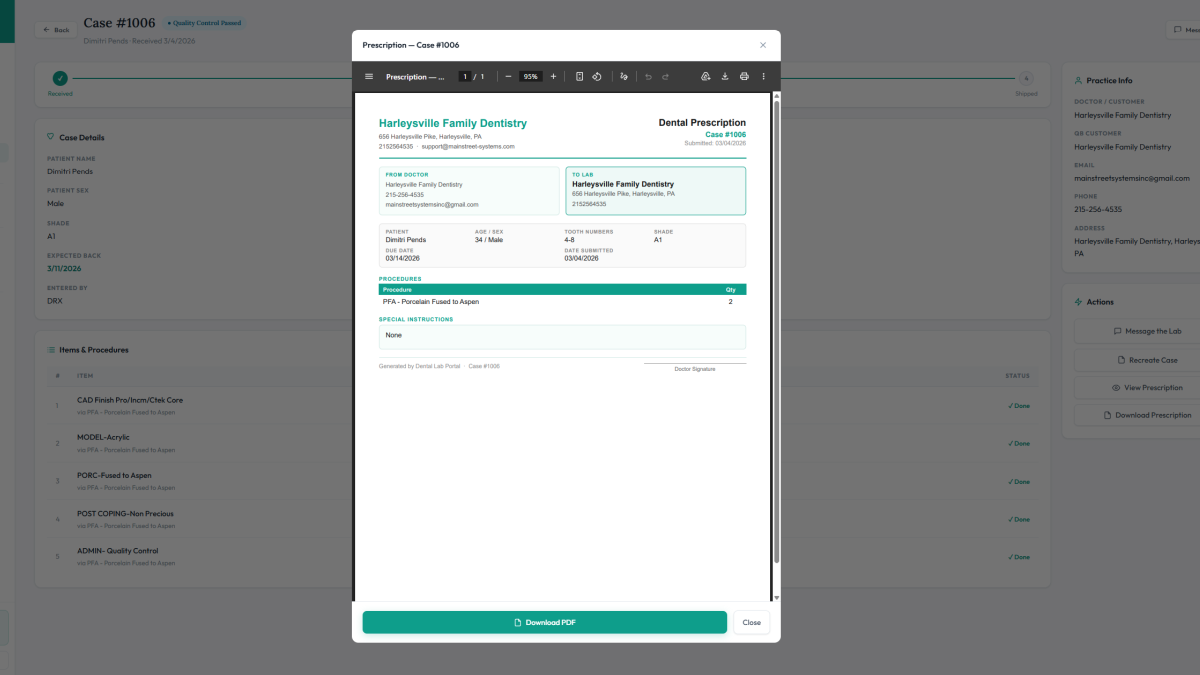
Prescription on file
Original prescription viewable any time.
4
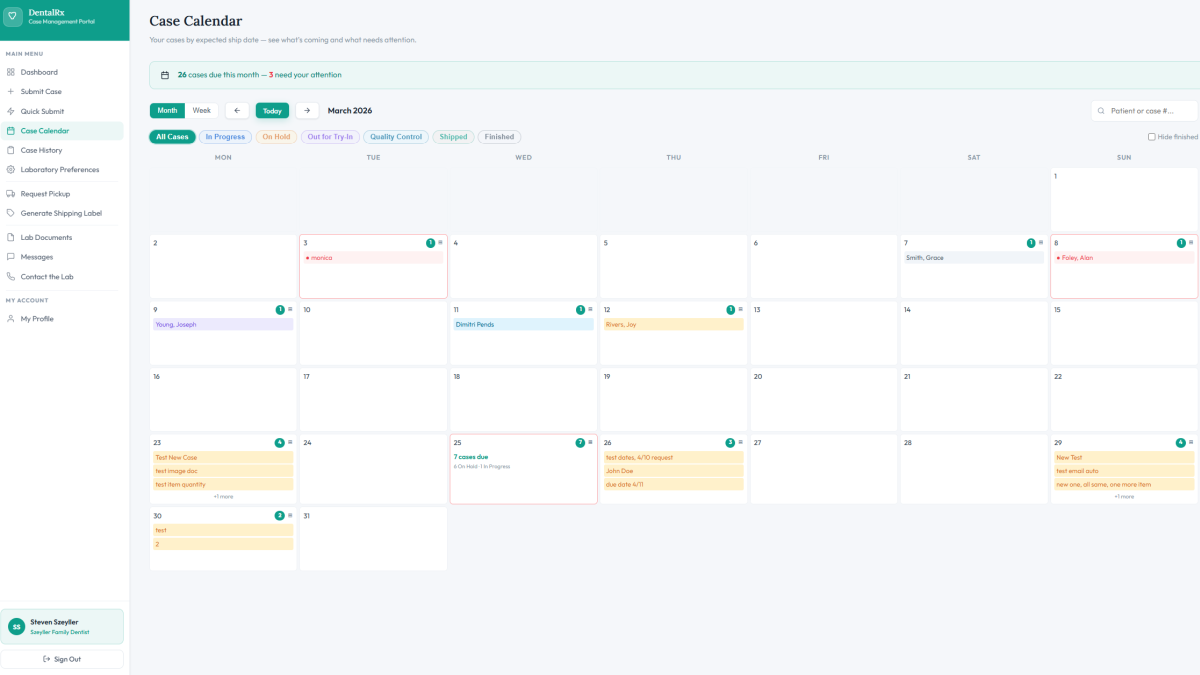
Case calendar
All cases by due date — filter by status.
DentalRx Portal — Dashboard
Case Management Portal
Dashboard
Submit Case
Quick Submit
Case Calendar
Case History
Messages
Lab Documents
Dr. Chen
Chen Family Dentistry
Good morning, Dr. Chen
Chen Family Dentistry · Friday, May 22, 2026
???? Pinned
Holiday Closure — July 4th
Our lab will be closed on July 4th in observance of Independence Day. Please plan case submissions accordingly.
New: Digital Impression Files Now Accepted
We now accept .STL and .PLY digital scan files directly through the portal in the Images, Documents & Digital Files section.
24Last 90 Days
6Received / Pending
5In Progress
2Quality Control
3Shipped
Recent Cases — last 90 daysView all
Case #PatientItemsDue DateStatus
#1011Mitchell, Sarah5 items5/28/2026In Progress
#1010Rivera, Carlos3 items5/26/2026Quality Control
#1009Thompson, Dana4 items5/24/2026Shipped
#1008Patel, Anita8 items5/23/2026Received
#1007Nguyen, James2 items5/21/2026Finished
← Back to Dashboard
Case #1011
In Progress
Mitchell, Sarah · Received 5/20/2026
Received
In Progress
3
Quality Control
4
Shipped
Case Details
Patient Name
Mitchell, Sarah
Age
38
Tooth Numbers
14, 15
Shade
A2
Due Date
5/28/2026
Expected Back
5/29/2026
Items & Procedures
#ItemQtyScheduledStatus
1
Crown-Full Cast NP
via Crown-Full Cast NP
1
5/26/2026
● In Progress
2
MODEL-Acrylic
via Crown-Full Cast NP
1
5/25/2026
✓ Done
3
PORC-Fused to Aspen
via Crown-Full Cast NP
1
5/27/2026
✓ Done
Practice Info
Doctor
Chen Family Dentistry
Phone
215-555-0142
Actions
Case Calendar
Your cases by expected ship date — see what's coming and what needs attention.
18 cases due this month — 4 need your attention
May 2026
All Cases
In Progress
On Hold
Out for Try-In
Quality Control
Shipped
Finished
Mon
Tue
Wed
Thu
Fri
Sat
Sun
28
29
30
1
2
Rivera, C.
3
4
5
Nguyen, J.
6
7
Park, L.
8
Kim, S.
Ortiz, M.
9
10
11
12
13
Thompson, D.
14
Patel, A.
15
16
Wang, B.
Lee, C.
17
18
19
20
22
Garcia, R.
+2 more
21
Davis, M.
23
24
25
26
27
28
Mitchell, S.
29
Brown, K.
Wilson, T.
30
31
1
Prescription — Case #1011
Chen Family Dentistry
215-555-0142 · dr.chen@chenfamily.com
Dental Prescription
Case #1011 · 5/20/2026
From Doctor / To Lab
From Doctor
Chen Family Dentistry
215-555-0142
To Lab
MainStreet Dental Lab
support@mainstreet-systems.com
Patient
Patient
Mitchell, Sarah
Age / Sex
38 / Female
Tooth #
14, 15
Shade
A2
Due Date
5/28/2026
Submitted
5/20/2026
Procedures
ProcedureQty
Crown-Full Cast NP1
Dr. Chen
Digital Files & CAD/CAM

Any file. Any format. Straight to the lab.

Doctors attach STL scans, X-rays, photos, and documents directly at submission. Files write instantly to the Dental Lab for QuickBooks data folder — no email, no re-entry, no separate upload step.

How it works
1
Quick Submit opened
Case data pre-filled from prior cases or templates.
2
Files attached
STL scans, X-rays, photos — drag, drop, or browse.
3
Transferred in real time
Files sync instantly to Dental Lab for QuickBooks.
4
Lab sees it immediately
Files appear in DQB the moment they're submitted.
DentalRx Portal — Dashboard
Case Management Portal
Dashboard
Quick Submit
Submit Case
Case Calendar
Case History
Messages
Dr. Chen
Chen Family Dentistry
Good morning, Dr. Chen
Chen Family Dentistry · Friday, May 22, 2026
New: Digital Impression Files Now Accepted
We now accept .STL and .PLY digital scan files directly through the portal.
24Last 90 Days
5In Progress
3Shipped
Quick Actions
← Dashboard
Quick Submit
Pre-filled from last case. Review and attach files.
Pre-filled from last casePatient, procedures & enclosures loaded automatically.
1 · Patient✓ Pre-filled
Patient Name
Martinez, Elena
Age
47
Shade
A3
Teeth
18, 19
2 · Procedures✓ Pre-filled
PFA-Porcelain Fused to Aspen
Full Model Enclosure
3 · Digital Files
Click to browse or drag & drop
STL · OBJ · DCM · PLY · JPG · PDF · ZIP
scan_martinez.stl
xray_martinez.dcm
photo_martinez.jpg
STLOBJPLYDCMJPGPNGPDFZIP
Dr. Chen
Behind the scenes
Files transferring automatically
The moment Dr. Chen submits, all attached files are written directly to the Dental Lab for QuickBooks data folder — no email, no upload, no action needed from the lab.
Real-time sync — happening now
C:\DentalLab\Cases\#1013_Martinez_Elena\Documents\
Attached Files ...\#1013_Martinez\Docs\
????
scan_martinez.stl
2.4 MB · CAD/CAM Scan · Scan folder
Just received
????
xray_martinez.dcm
1.1 MB · DICOM X-Ray · Document folder
Just received
????️
photo_martinez.jpg
340 KB · Clinical Photo · Document folder
Just received
All 3 files received in Dental Lab for QuickBooks Available to lab staff immediately — no manual import needed.
Everything Your Lab Needs

One portal. Every feature.

DentalRx gives your doctors a professional, branded portal — and gives your lab complete control over every case, communication, and file.
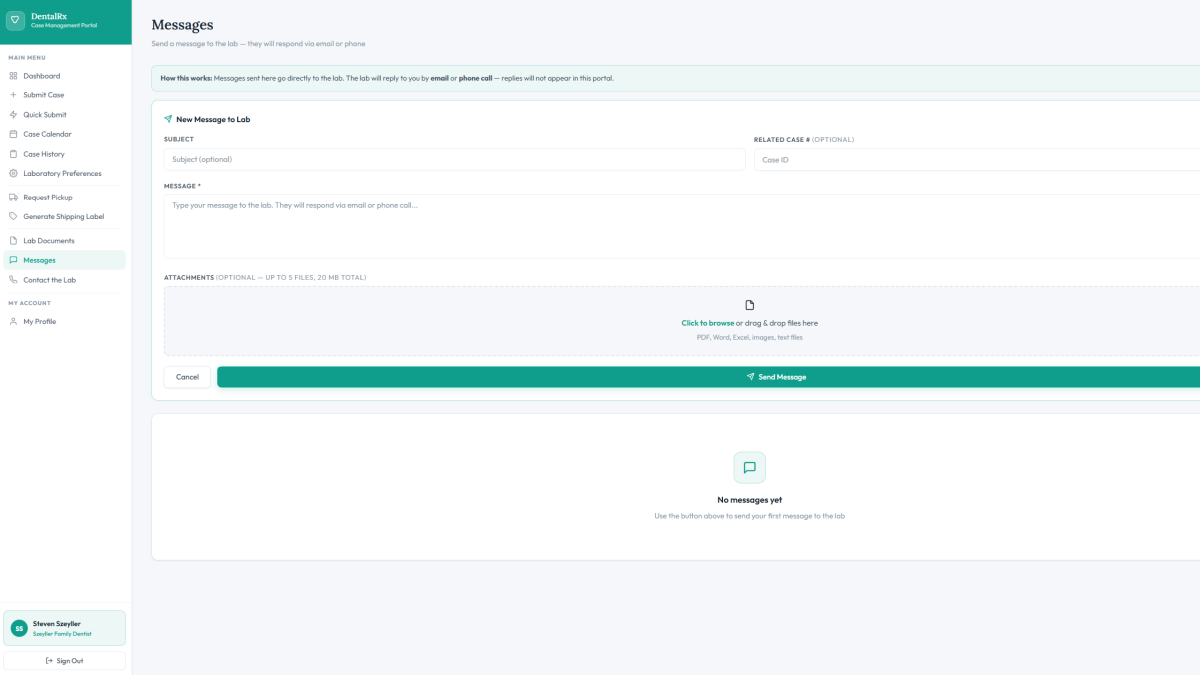
DentalRx Portal — Messages
Doctor sending a case message through the DentalRx portal on a phone, with the message arriving in the lab's email inbox
Two-Way Messaging
Doctors send messages directly through the portal — each one also arrives in your lab's email inbox. Your team can reply by email or through the portal, whichever fits your workflow. No new habits required.
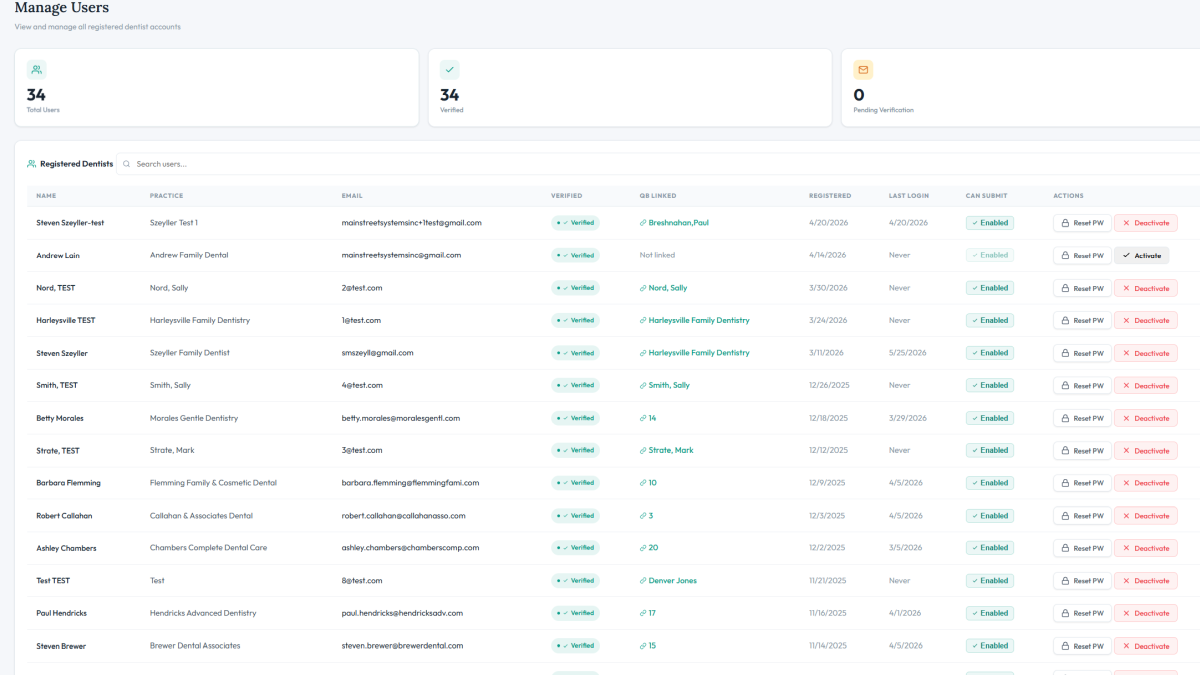
DentalRx Portal — Doctor Accounts
Lab admin approving a new doctor account in the DentalRx portal on a desktop screen
Doctor Registration & Access Control
Your lab controls who gets portal access. Every doctor account is verified and approved by you before they can submit a single case.
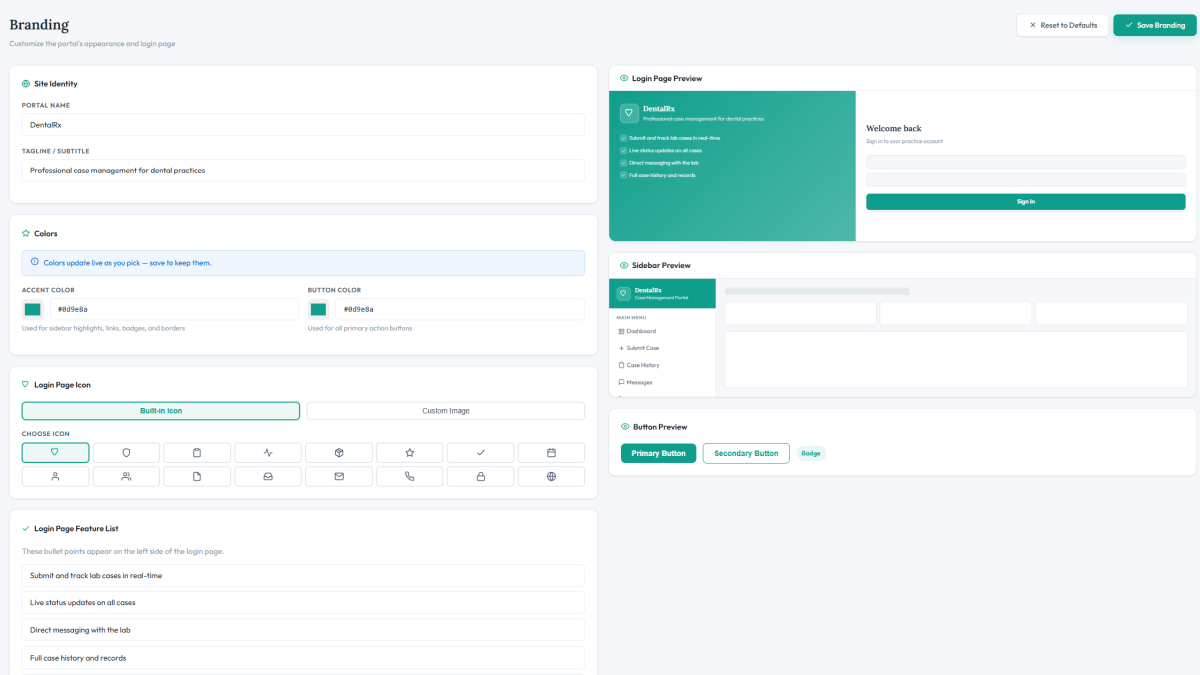
DentalRx Portal — Lab Branding
DentalRx portal displaying a dental lab's custom logo and brand name on a phone screen
White-Label Branding
Doctors see your lab's name and logo — not mainstreet's. DentalRx runs under your brand on your URL, building loyalty with every login.
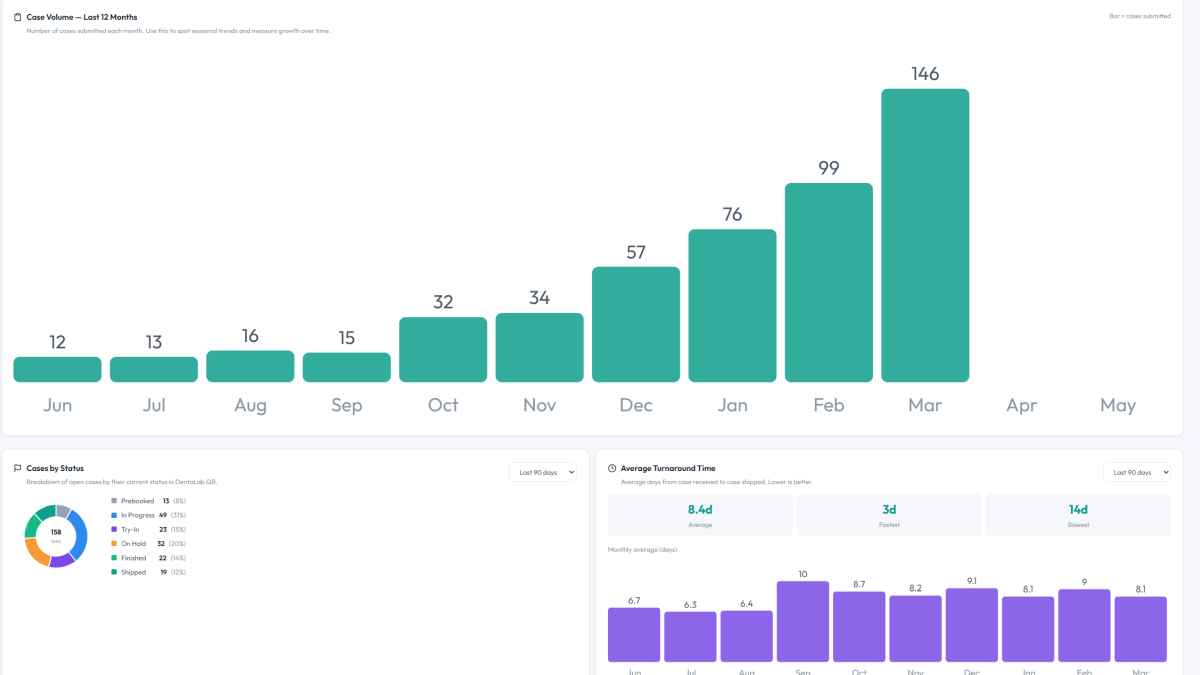
DentalRx Portal — Insights
DentalRx Portal Insights analytics dashboard showing case volume and doctor activity on a tablet screen
Portal Insights
See which doctors are most active, track submission volume, and monitor portal usage — analytics built right into the lab portal.
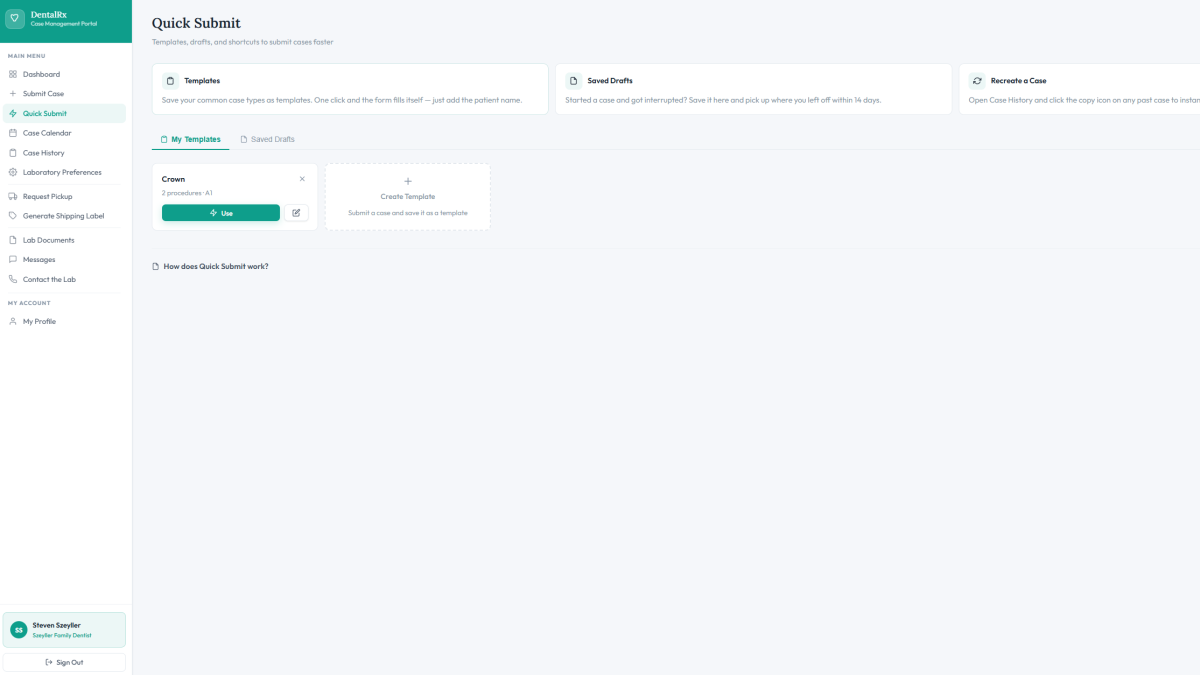
DentalRx Portal — Quick Submit
Doctor using Smart Submit with a pre-filled case template in the DentalRx portal on a phone screen
Smart Submit
Cases pre-fill from prior submissions or templates — doctors submit faster, with fewer errors, and less back-and-forth with your team.
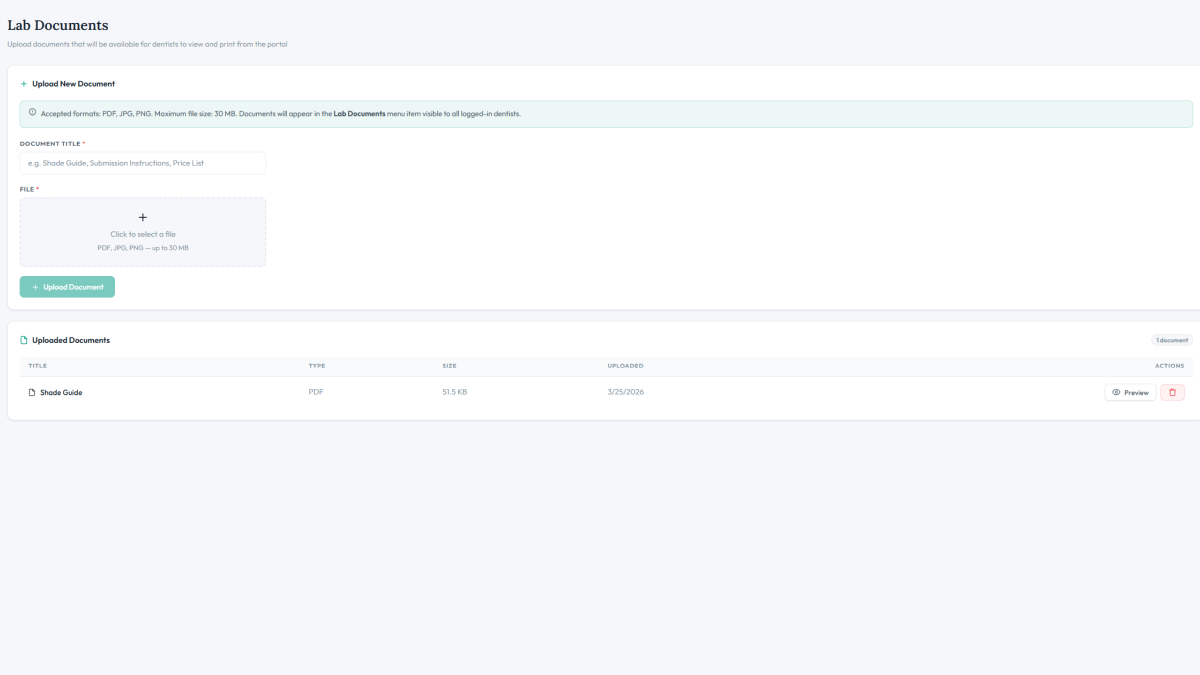
DentalRx Portal — Lab Documents
Dental lab sharing a price guide with doctors in the DentalRx documents section on a desktop screen
Lab Documents
Share price guides, shade guides, consent forms, and lab policies directly with your doctors — always up to date, always accessible.
DentalRx Portal — Case Calendar
Doctor viewing upcoming case due dates by status in the DentalRx case calendar on a phone screen
Case Calendar
Doctors see all their cases by due date, filterable by status — so nothing falls through the cracks and they never need to call to check.
DentalRx Portal — Prescription
Doctor viewing the original prescription for a case in the DentalRx portal on a phone screen
Prescription on File
The original prescription is always viewable by the doctor — anytime, on any device. No printing, no filing, no hunting through old emails.
DentalRx — Dental Lab for QuickBooks
DentalRx portal syncing a submitted case with Dental Lab for QuickBooks shown on a desktop screen
Dental Lab for QuickBooks Integration
Every case submitted through DentalRx flows directly into Dental Lab for QuickBooks — no re-entry, no duplicate work, no data loss.
And much more
Ready to see DentalRx in action?

Every feature is built specifically for dental labs running Dental Lab for QuickBooks. No generic software, no workarounds — just a portal that works the way your lab does.

Contact Us
DentalRx in Action

See DentalRx in action.

Start with the 2-minute intro, then dive deeper with our full tutorial library.
Mainstreet Systems and Software Inc. on YouTube
Tutorials, feature walkthroughs, and updates for Dental Lab for QuickBooks
Visit Our Channel
Get Started

Ready to add DentalRx
to your lab?

Built exclusively for labs running Dental Lab for QuickBooks. Setup takes days — and we handle everything from configuration to your first doctor login.

Setup in days, not weeks
White-labeled for your lab
No per-doctor fees
Not on Dental Lab for QuickBooks yet? Learn more
Your next step
Talk to the
Mainstreet team
Contact Us